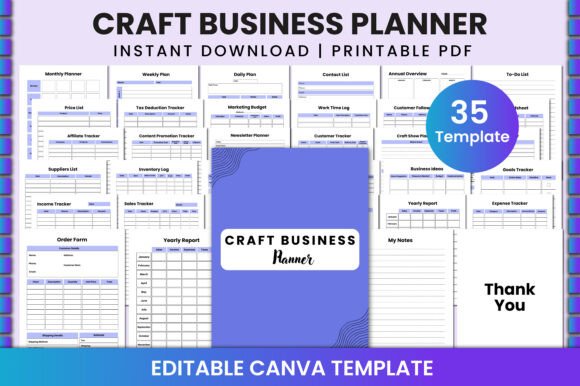
Craft Business Planner for Canva: A Practical Tool for Organized Creativity
For creative professionals and small business owners, staying organized is often a challenge. Between managing projects, tracking expenses, and planning content, the need for a reliable planner becomes essential. Enter the Craft Business Planner for Canva, an editable template designed to streamline workflow and enhance productivity. This tool isn't just another generic planner—it's tailored for creators who want to manage their craft businesses efficiently while leveraging the power of Canva.
The Craft Business Planner for Canva is more than a downloadable PDF; it's a dynamic, customizable resource that adapts to your unique needs. Whether you're a blogger, marketer, or artisan, this planner offers a comprehensive suite of tools that help organize daily tasks, monitor financials, and plan long-term goals—all within a single, cohesive interface.
What Makes This Planner Stand Out?
The standout feature of this planner is its editability. Unlike static templates, this one allows users to modify layouts, add personal notes, and tailor sections to fit their specific workflows. The integration with Canva means that even those without design experience can create professional-looking documents with ease.
With over 35 different Canva templates included, users have the freedom to choose designs that match their brand’s aesthetic. These templates are optimized for 8.5 x 11 inches, ensuring they print cleanly and look polished whether used digitally or in physical form. The high resolution (300 DPI) and CMYK color profile make it ideal for both digital use and print-on-demand platforms like KDP.
One of the most valuable aspects of this planner is its comprehensive coverage of business needs. It includes everything from daily and weekly planning to annual overviews, making it a versatile tool for both short-term and long-term organization.
Key Features and Their Practical Value
Let’s break down some of the core features and how they contribute to real-world usability:
- Daily Plan: Ideal for setting priorities each morning. Users can quickly jot down tasks, deadlines, and appointments without sifting through cluttered calendars.
- Weekly Plan: Helps visualize the week ahead, allowing for better time management and project scheduling.
- Monthly Planner: Great for tracking recurring events, billing cycles, and seasonal promotions.
- Annual Overview: Provides a bird’s-eye view of the year, helping users align their goals with broader business strategies.
- To-Do List: Keeps track of immediate actions, ensuring nothing falls through the cracks.
- Contact List: Centralizes client, supplier, and collaborator information for easy access.
- Work Time Log: Tracks hours spent on various tasks, useful for freelancers and consultants who bill by the hour.
- Marketing Budget: Enables budget allocation for campaigns, social media ads, and other promotional efforts.
- Tax Deduction Tracker: Assists in keeping records of deductible expenses, which is especially helpful during tax season.
- Price List: Maintains up-to-date pricing for products or services, reducing errors and saving time.
- Budget Spreadsheet: Offers a structured way to monitor income and expenses, supporting informed financial decisions.
- Customer Follow-Up List: Ensures consistent communication with clients and helps maintain strong relationships.
- Newsletter Planner: Helps schedule and plan content for newsletters, blogs, or email campaigns.
- Affiliate Tracker: Monitors affiliate marketing performance, including links, conversions, and earnings.
- Craft Show Tracker: Keeps track of upcoming shows, booths, and preparation timelines.
- Purchase Tracker: Logs all purchases, making it easier to manage inventory and reorder supplies.
- Inventory Log: Keeps a running tally of stock levels, preventing overstocking or shortages.
- Suppliers List: Centralizes supplier details, contact info, and preferred terms.
- Goals Tracker: Allows users to set and monitor both short-term and long-term objectives.
- Business Ideas: A space for brainstorming new product lines, services, or ventures.
- Order Form: Streamlines the process of receiving and processing customer orders.
- Invoice: Generates professional invoices with customizable fields and branding.
- Sales Tracker: Records sales data for analysis and forecasting.
- Income Tracker: Tracks revenue sources, helping identify top-performing areas.
- Expense Tracker: Logs all business-related costs, aiding in financial oversight.
- Yearly Report: Compiles key metrics and achievements into a summary report for review or sharing with stakeholders.
- Planner Notes: A flexible section for adding reminders, tips, or reflections.
- My Notes: Personal journal space for ideas, inspirations, or work progress.
- Thank You Page: A thoughtful addition for acknowledging support, clients, or collaborators.
This level of detail ensures that no aspect of a craft business goes unaddressed. From managing day-to-day operations to planning for growth, the Craft Business Planner for Canva serves as a central hub for efficiency and clarity.
Who Benefits Most from This Planner?
The Craft Business Planner for Canva is particularly beneficial for individuals and small teams engaged in creative or service-based industries. Here are a few examples of who might find it especially useful:
- Artisans and Crafters: Those selling handmade goods online or at markets can use the planner to track inventory, orders, and event schedules.
- Freelancers and Consultants: The time log, invoice generator, and expense tracker are invaluable for managing freelance work and taxes.
- Bloggers and Content Creators: With features like newsletter planners and content promotion trackers, this tool supports consistent publishing and audience engagement.
- Small Business Owners: Entrepreneurs running boutique shops or service-based businesses can streamline operations with integrated budgeting and goal-setting tools.
- Marketers and Brand Managers: The planner helps organize campaigns, track affiliate performance, and maintain brand consistency across platforms.
Its flexibility makes it suitable for a wide range of professions, but it shines brightest when used by those who value structure and organization in their creative processes.
Real-World Performance and Usability
In practice, the Craft Business Planner for Canva performs exceptionally well. Its intuitive layout and clear sections reduce the learning curve, allowing users to get started quickly. The ability to edit and customize templates directly in Canva is a major plus, as it eliminates the need for additional software or design skills.
Users have reported that the planner helps them stay on top of deadlines, manage budgets more effectively, and maintain a consistent workflow. For instance, a small studio owner noted that using the planner helped her reduce administrative tasks by 30%, allowing her to focus more on creating and less on paperwork.
However, it’s worth noting that while the planner is highly functional, it may not be suitable for very large-scale operations that require complex accounting systems or CRM integrations. It’s best suited for solo entrepreneurs or small teams looking for a streamlined solution.
Final Thoughts and Recommendations
The Craft Business Planner for Canva is a well-designed, practical tool that offers significant value to creative professionals and small business owners. Its blend of functionality, customization, and ease of use makes it a compelling choice for anyone seeking to improve their organizational efficiency.
If you’re someone who values structure, prefers working in Canva, and wants a planner that grows with your business, this product could be a great fit. As always, consider your specific needs and workflow before investing—this planner is ideal for those who benefit from a centralized system for managing multiple facets of their craft business.